Pro plan from £5 per endpoint per month · see pricing
Secronyx
AvailableLinux

Squid

See how busy a Squid proxy is, how well its cache is hitting, whether it is running out of file descriptors and how much traffic it has carried since it started, from its cache manager on this host with read-only requests.

What it answers

Questions an on-call engineer asks, which an AI client can answer with this integration.

  • Is Squid running out of file descriptors?
  • What is the cache hit ratio over the last 5 and 60 minutes?
  • How many requests has Squid served, and how many came from the cache?
  • Are requests to origin servers failing or being aborted?
  • Which Squid version runs, and when did it last restart?

What it returns

Each of the integration's read-only tools, described in words.

  • Squid runtime state in one row - version, uptime, clients, requests, cache hit ratios and median service times over 5 and 60 minutes, cache size, CPU, memory and file descriptor use
  • Squid totals since start in one row - client requests, cache hits, errors and kilobytes, requests and errors to origin servers, aborted requests, swap activity, page faults, CPU and wall time

At a glance

Integration
squid 1.0.0
Publisher
levantar
Platforms
Linux

Tested on

  • Squid 6.10 and 6.13 on Linux (Ubuntu 24.04, Docker), test lab

How it logs in

Without an explicit choice, configure tries the methods that need no secret first, in this order.

  • No login (a local endpoint)
  • A user name and password

The least-privilege login

The setup file that comes with it. secronyx integration setup squid prints it; an administrator applies it by hand.

# The least privilege for the squid integration. Squid's cache manager has no # users or roles. The manager ACL decides who reaches it, and # cachemgr_passwd decides which reports and actions they can run, with or # without a password. The integration sends GETs for two reports, info and # counters, and its privilege check reads the menu. With Squid's defaults, # whoever reaches the manager can also read the reports that list client # addresses, user names and the URLs being fetched or cached # (client_list, active_requests, username_cache, objects, filedescriptors # and more). The lines below close everything the integration does not need. # # 1. Reach the manager from this host only. Squid's default squid.conf # already has these two lines, before any other http_access allow: http_access allow localhost manager http_access deny manager # 2. Without a password (auth none): the three reports are open to this # host, every other report and action is off. The first cachemgr_passwd # line that names an action wins, so keep this order: cachemgr_passwd none info counters menu cachemgr_passwd disable all # 3. Or with a password (auth password): use this line instead of the # "none" line in 2, and keep "disable all" after it. Squid stores the # password in squid.conf as plain text, so make the file readable by # root and Squid's group only. Squid reads the password from HTTP Basic # and ignores the user name. # # cachemgr_passwd <a password for the integration only> info counters menu # cachemgr_passwd disable all # # 4. Reload Squid (squid -k reconfigure), then configure the integration: # secronyx integration configure squid (auth none) # secronyx integration configure squid --auth password (auth password) # For another port: --endpoint 127.0.0.1:<port> # # The privilege check refuses a login when shutdown, reconfigure, rotate, # offline_toggle or config (the configuration with its secrets) is open # without a password, or, for a password login, open to any password: # Squid cannot say which password opens an action without running it. If # you run those actions through the manager with another password, keep # the integration on auth none, or accept the login with --allow-privileged. # "squid -k shutdown|reconfigure|rotate" use signals and keep working # with the actions disabled here.

See it run

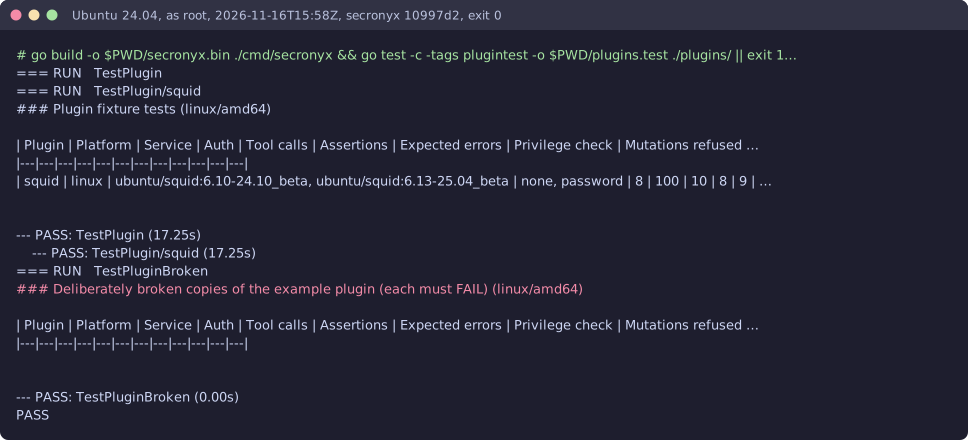
Terminal recording from the test lab: squid-linux-harness
A real run on the shared test lab. It predates built-in integrations, so the commands on screen use their older names.

Read-only, in layers

Every request is a GET or HEAD to the endpoint the operator configured, on a path fixed in the signed pack. Redirects are not followed, and requests known to change state are refused.

These controls narrow what the integration can do; none of them is a guarantee on its own. An administrator can still accept a more powerful login on purpose (audited and shown in status), root or Administrator on the host can replace the agent, and the integration can read whatever its login can see.