Patroni
See which member leads the PostgreSQL cluster, which replicas stream, lag or are stopped, whether it is paused, and when the primary last changed, through the REST API's reads with no login. This plugin is in the next Secronyx release; the current download does not include it yet.
What it answers
Questions an on-call engineer asks, which an AI client can answer with this plugin.
- Which member is the leader, and which replicas are stopped or lagging?
- Is this host the primary or a replica, and is it streaming?
- Is the cluster in maintenance mode, and when did this member last reach the DCS?
- When did the last failover or switchover happen, and which member took over?
- Which members are waiting for a restart?
What it returns
Each of the plugin's read-only tools, described in words.
- Every member of the Patroni cluster from the DCS - name, role (leader, replica, sync standby), state, host and port, timeline, replication lag in bytes and pending restarts
- Status of this Patroni member - name and scope, role, PostgreSQL state and version, timeline, WAL positions, replication state, pause, a cluster without a leader lock and when the DCS was last seen
- The Patroni cluster's failover and switchover history, one row per timeline change - the old timeline, the LSN where it ended, the reason, when, and the member that became leader
At a glance
- Plugin
- patroni 1.0.0
- Publisher
- levantar
- Platforms
- Linux
Tested on
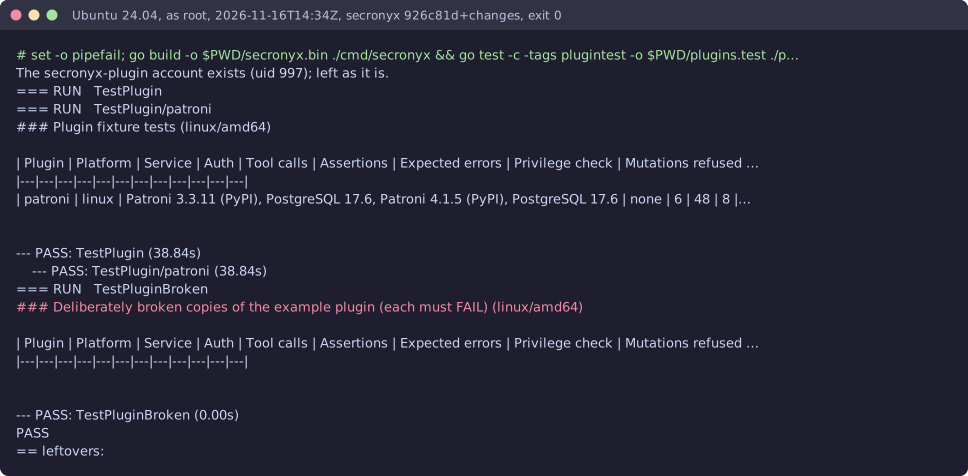
- Patroni 3.3.11 and 4.1.5 with PostgreSQL 17.6 and etcd 3.6.16 on Linux (Ubuntu 24.04, Docker), test lab
How it logs in
Without an explicit choice, install tries the methods that need no secret first, in this order.
- No login (a local endpoint)
- A user name and password
- A client certificate
The least-privilege login
The setup file in the pack. secronyx plugin setup patroni prints it; an administrator applies it by hand.
See it run
Read-only, in layers
Every request is a GET or HEAD to the endpoint the operator configured, on a path fixed in the signed pack. Redirects are not followed, and requests known to change state are refused.
These controls narrow what the plugin can do; none of them is a guarantee on its own. An administrator can still accept a more powerful login on purpose (audited and shown in status), root or Administrator on the host can replace the agent, and the plugin can read whatever its login can see.