Alertmanager
See which alerts Alertmanager holds and whether a silence or inhibition suppresses them, which silences exist and what they match, and whether the cluster has formed, through read-only requests to the HTTP API. This plugin is in the next Secronyx release; the current download does not include it yet.
What it answers
Questions an on-call engineer asks, which an AI client can answer with this plugin.
- Did Alertmanager receive the alert, and is it silenced or inhibited?
- Which receiver does an alert route to?
- Which silences are active, what do they match and when do they end?
- Who created a silence?
- Is the Alertmanager cluster ready, and which peers are in it?
- Which Alertmanager version is running, and since when?
What it returns
Each of the plugin's read-only tools, described in words.
- Alerts Alertmanager holds with their name, severity, job and instance, state (active, suppressed or unprocessed), the silences and alerts that suppress them, receivers, labels and start and end times
- Alertmanager silences with their ID, state (active, pending or expired), the label matchers they apply to, who created them, and when they start, end and were last updated
- Alertmanager cluster state in one row - whether gossip is ready, settling or disabled, the cluster peers and their addresses, this node's name, the version and when it started
At a glance
- Plugin
- alertmanager 1.0.0
- Publisher
- levantar
- Platforms
- Linux, Windows, macOS
Tested on
- Alertmanager 0.27.0 and 0.34.2 on Linux (Ubuntu 24.04, Docker), test lab
- Alertmanager 0.27.0 on macOS (official release), test lab
- Alertmanager 0.27.0 on Windows Server 2022 (official release), test lab
How it logs in
Without an explicit choice, install tries the methods that need no secret first, in this order.
- No login (a local endpoint)
- A user name and password
- A bearer token
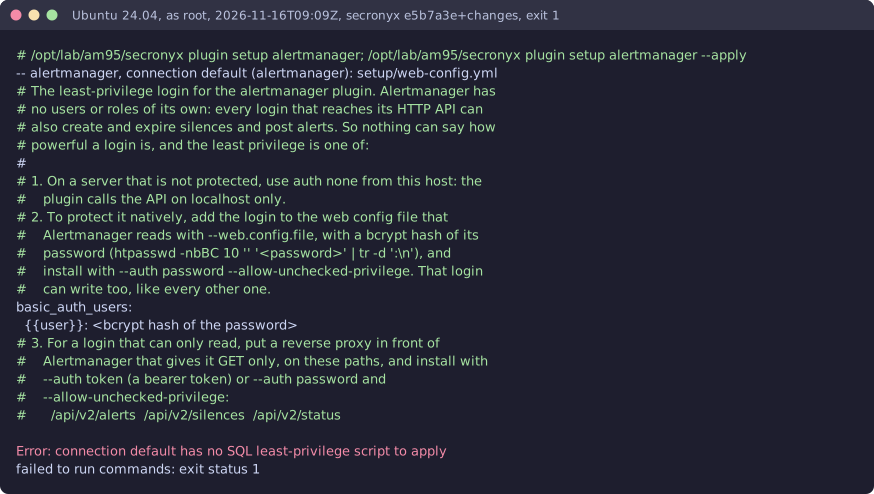
The least-privilege login
The setup file in the pack. secronyx plugin setup alertmanager prints it; an administrator applies it by hand.
See it run



Read-only, in layers
Every request is a GET or HEAD to the endpoint the operator configured, on a path fixed in the signed pack. Redirects are not followed, and requests known to change state are refused.
These controls narrow what the plugin can do; none of them is a guarantee on its own. An administrator can still accept a more powerful login on purpose (audited and shown in status), root or Administrator on the host can replace the agent, and the plugin can read whatever its login can see.