etcd
See which etcd members are down or unhealthy, whether the database has hit its quota, who leads and how far raft has got, through a login that needs no permission on any key. This plugin is in the next Secronyx release; the current download does not include it yet.
What it answers
Questions an on-call engineer asks, which an AI client can answer with this plugin.
- Is every member of the etcd cluster healthy, and why is one not?
- Has the database reached its quota, so that writes fail with an alarm?
- Which member is the leader, and are elections repeating?
- How large is the database, and how much of it is in use?
- Which members does the cluster have, and is one still a learner?
What it returns
Each of the plugin's read-only tools, described in words.
- Health of every etcd member the cluster lists - healthy or not, how long the check took, and the error, such as an unreachable member or an active NOSPACE or CORRUPT alarm
- Status of the local etcd member - version, its member ID and the leader's, raft term and index, database size and size in use against the quota, learner state and errors
- Members of the etcd cluster with their ID, name, peer and client URLs and whether each is a learner, including members that are down
- Active etcd alarms, each with the member that raised it and its type - 1 is NOSPACE (the database reached its quota, so writes fail) and 2 is CORRUPT
At a glance
- Plugin
- etcd 1.0.0
- Publisher
- levantar
- Platforms
- Linux, Windows, macOS
Tested on
- etcd 3.5.35, 3.6.16 and 3.7.3 on Linux (Ubuntu 24.04, official releases), test lab and CI runner
- etcd 3.7.3 on macOS 15 (Homebrew, Intel), test lab; Homebrew etcd on macOS (arm64), CI runner
- etcd 3.6.16 on Windows Server 2022 (official release), test lab and CI runner
How it logs in
Without an explicit choice, install tries the methods that need no secret first, in this order.
- A client certificate
- A user name and password
- No login (a local endpoint)
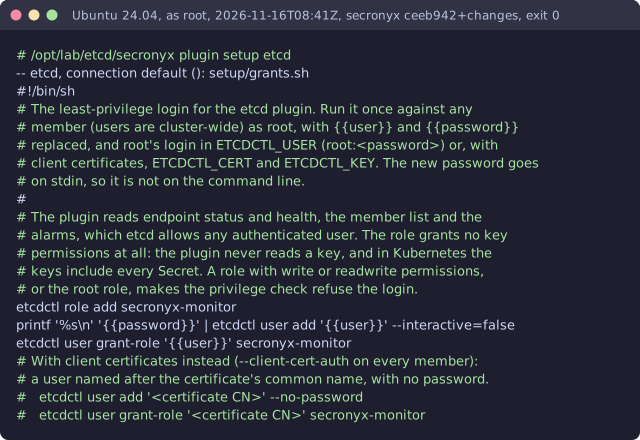
The least-privilege login
The setup file in the pack. secronyx plugin setup etcd prints it; an administrator applies it by hand.
See it run


Read-only, in layers
Every command is a binary on the agent's allowlist with one of its exact argument forms. There is no shell, the environment is clean, and it never runs as root or with SYSTEM's privileges.
These controls narrow what the plugin can do; none of them is a guarantee on its own. An administrator can still accept a more powerful login on purpose (audited and shown in status), root or Administrator on the host can replace the agent, and the plugin can read whatever its login can see.