Apache Tomcat
See whether Tomcat has run out of request threads, which requests hold them and for how long, and how full each JVM memory pool is, with a status-only manager login. This plugin is in the next Secronyx release; the current download does not include it yet.
What it answers
Questions an on-call engineer asks, which an AI client can answer with this plugin.
- Are all of Tomcat's request threads busy, so that new requests queue or time out?
- Which URIs and clients are holding Tomcat's threads, and for how long?
- How many requests has each connector served, and how many failed?
- Is the Tomcat JVM close to running out of heap or metaspace?
- Does the monitoring login hold only the status role, and nothing that can deploy or stop applications?
What it returns
Each of the plugin's read-only tools, described in words.
- Tomcat JVM memory, one row per memory pool - heap and non-heap, bytes used, committed, maximum and initial
- Tomcat connectors, one row each - busy, current and maximum request threads, requests and errors since start, total and longest processing time, and bytes received and sent
- Tomcat request threads on every connector, one row each - stage (S service, P parse, F finishing, K keep-alive, R ready), time on the request, method, URI path without query, host, client and bytes
At a glance
- Plugin
- tomcat 1.0.0
- Publisher
- levantar
- Platforms
- Linux, Windows, macOS
Tested on
- Apache Tomcat 9.0.124 and 10.1.61 on Linux (Ubuntu 24.04, Docker), test lab
- Apache Tomcat 10.1.61 on macOS 15 (Apache tarball, Intel), test lab; macOS (arm64), CI runner
- Apache Tomcat 10.1.61 on Windows Server (Apache zip), CI runner
How it logs in
Without an explicit choice, install tries the methods that need no secret first, in this order.
- A user name and password
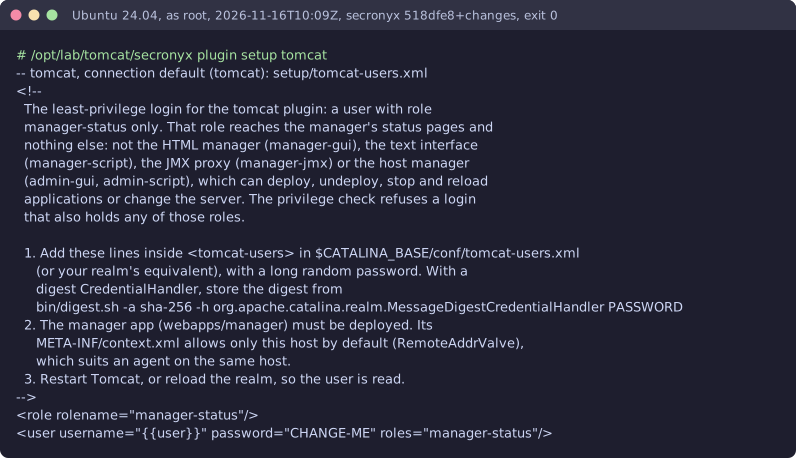
The least-privilege login
The setup file in the pack. secronyx plugin setup tomcat prints it; an administrator applies it by hand.
See it run


Read-only, in layers
Every request is a GET or HEAD to the endpoint the operator configured, on a path fixed in the signed pack. Redirects are not followed, and requests known to change state are refused.
These controls narrow what the plugin can do; none of them is a guarantee on its own. An administrator can still accept a more powerful login on purpose (audited and shown in status), root or Administrator on the host can replace the agent, and the plugin can read whatever its login can see.