Elasticsearch and OpenSearch
See why a cluster is yellow or red, which shards are unassigned and what blocks them, how the nodes' heap, CPU and disk compare with the watermarks, and what the master is busy with, through read-only monitor requests. This plugin is in the next Secronyx release; the current download does not include it yet.
What it answers
Questions an on-call engineer asks, which an AI client can answer with this plugin.
- Is the cluster green, yellow or red, and how many shards are unassigned?
- Which shards are unassigned, and which allocation rule keeps them so?
- Which node is short of heap or disk, and which node is the master?
- Which disk watermarks are in effect, and are they why an index went read-only?
- What is waiting for the master, and for how long?
- Which threads are using the CPU on a slow node?
What it returns
Each of the plugin's read-only tools, described in words.
- Elasticsearch or OpenSearch cluster health in one row - status (green, yellow or red), nodes, active, relocating, initializing, unassigned and delayed shards and pending tasks
- Elasticsearch or OpenSearch nodes with their roles, the elected master, version, heap and RAM use, CPU, load averages, disk use and free bytes, and uptime
- Elasticsearch or OpenSearch shards not assigned to any node - index, shard, primary or replica, the reason (INDEX_CREATED, NODE_LEFT, ALLOCATION_FAILED, ...), since when and failed attempts
- Why Elasticsearch or OpenSearch cannot allocate the first unassigned shard it finds - the shard, its reason, whether it can be allocated and each node's deciding rules (same shard, disk, filters)
- Elasticsearch or OpenSearch cluster changes waiting for the master - each task's priority, source (create-index, put-mapping, shard-started, ...), whether it runs and how long it has waited
- The busiest threads on an Elasticsearch or OpenSearch node as text - the CPU, wait or block share of each thread over half a second with its stack, from the nodes hot threads API
- The disk-based shard allocation settings Elasticsearch or OpenSearch uses - whether the disk threshold is on, and the low, high and flood-stage watermarks from transient, persistent or defaults
At a glance
- Plugin
- elasticsearch 1.0.0
- Publisher
- levantar
- Platforms
- Linux, macOS
Tested on
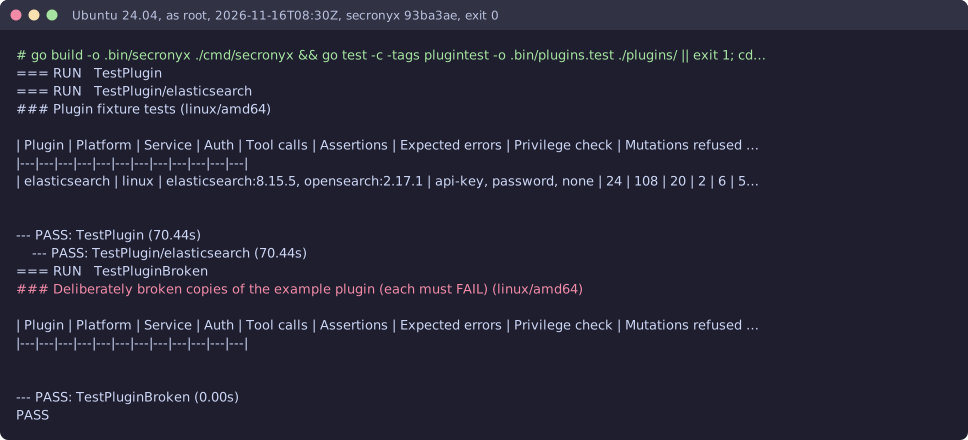
- Elasticsearch 8.15.5 and OpenSearch 2.17.1 on Linux (Ubuntu 24.04, Docker), test lab and CI runner
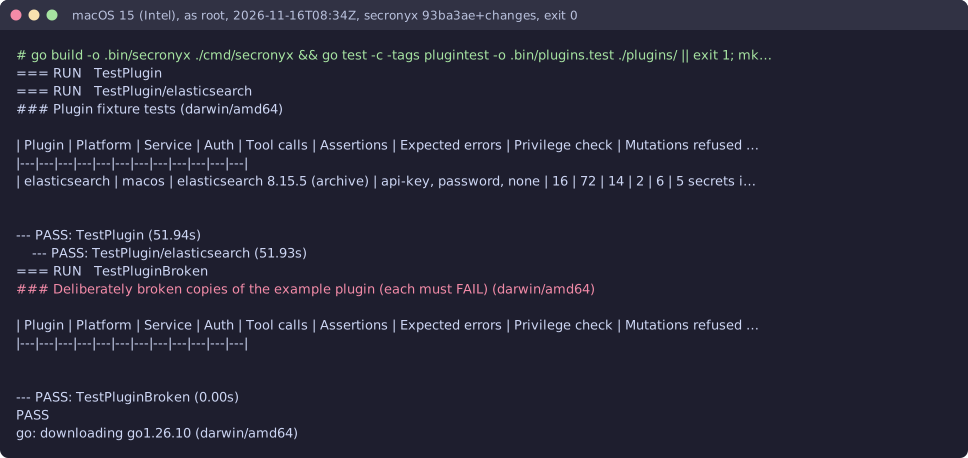
- Elasticsearch 8.15.5 on macOS 15 (official archive, Intel), test lab; on macOS (arm64), CI runner
How it logs in
Without an explicit choice, install tries the methods that need no secret first, in this order.
- An API key
- A user name and password
- A client certificate
- No login (a local endpoint)
The least-privilege login
The setup file in the pack. secronyx plugin setup elasticsearch prints it; an administrator applies it by hand.
See it run
Read-only, in layers
Every request is a GET or HEAD to the endpoint the operator configured, on a path fixed in the signed pack. Redirects are not followed, and requests known to change state are refused.
These controls narrow what the plugin can do; none of them is a guarantee on its own. An administrator can still accept a more powerful login on purpose (audited and shown in status), root or Administrator on the host can replace the agent, and the plugin can read whatever its login can see.