Demo · Falco
Turn a Falco runtime detection into a host-level investigation, without giving AI shell access
A Falco rule fires on a credential search, Falcosidekick sends the event to Secronyx, which gathers signed evidence from inside the host in under a second, and Claude works out what happened. Nothing on the host can be changed, and every check is on record.
Falco saw a program in /dev/shm hunting for private keys and AWS credentials on web-1. Through Secronyx, Claude worked out the whole chain: what started it, what it ran as, what it touched and that it was still running disguised as a kernel thread. It also showed that web-1's twin, web-2, has none of it. There was no shell access and no change to either host.
Request accessSee the investigation
This is a recorded run in AWS, not a mock-up. A Falco rule fired, Falcosidekick sent the event to Secronyx, and Claude, Anthropic's AI assistant, picked up from there. We recorded it on 12 November 2026 in AWS's London region. All times are UTC.
The problem
- A runtime detection says what happened, not what it means. Falco saw
findlooking for key files. It can't say whether the program is still running, how it got there, whether it left anything behind, or whether the host's twin looks the same. - Giving an AI a shell is too risky. A shell can change anything and read anything. You don't hand that to an AI on a production server, least of all one that may be compromised.
- There's no trail of what the AI looked at. When an AI reaches a verdict, you need to know what it saw, on which host, and who allowed it.
The investigation: a credential hunt on web-1
We planted a harmless stand-in for an attacker's credential hunt on web-1, one of two identical web servers. A script in a hidden directory under /dev/shm, named kworker:
- searched the disk for SSH private keys and
.pemfiles; - searched
/rootand/homefor AWS secret keys, listing file names only; - opened
/etc/shadowwithout reading a byte; - then renamed itself
[kworker/u4:3], to look like a kernel thread, and slept.
It wrote the file names it found to a local file and sent nothing anywhere. Falco runs on both web servers with its default rules, and Falcosidekick forwards events of warning priority and above.
In the screenshots, tool names are blanked.
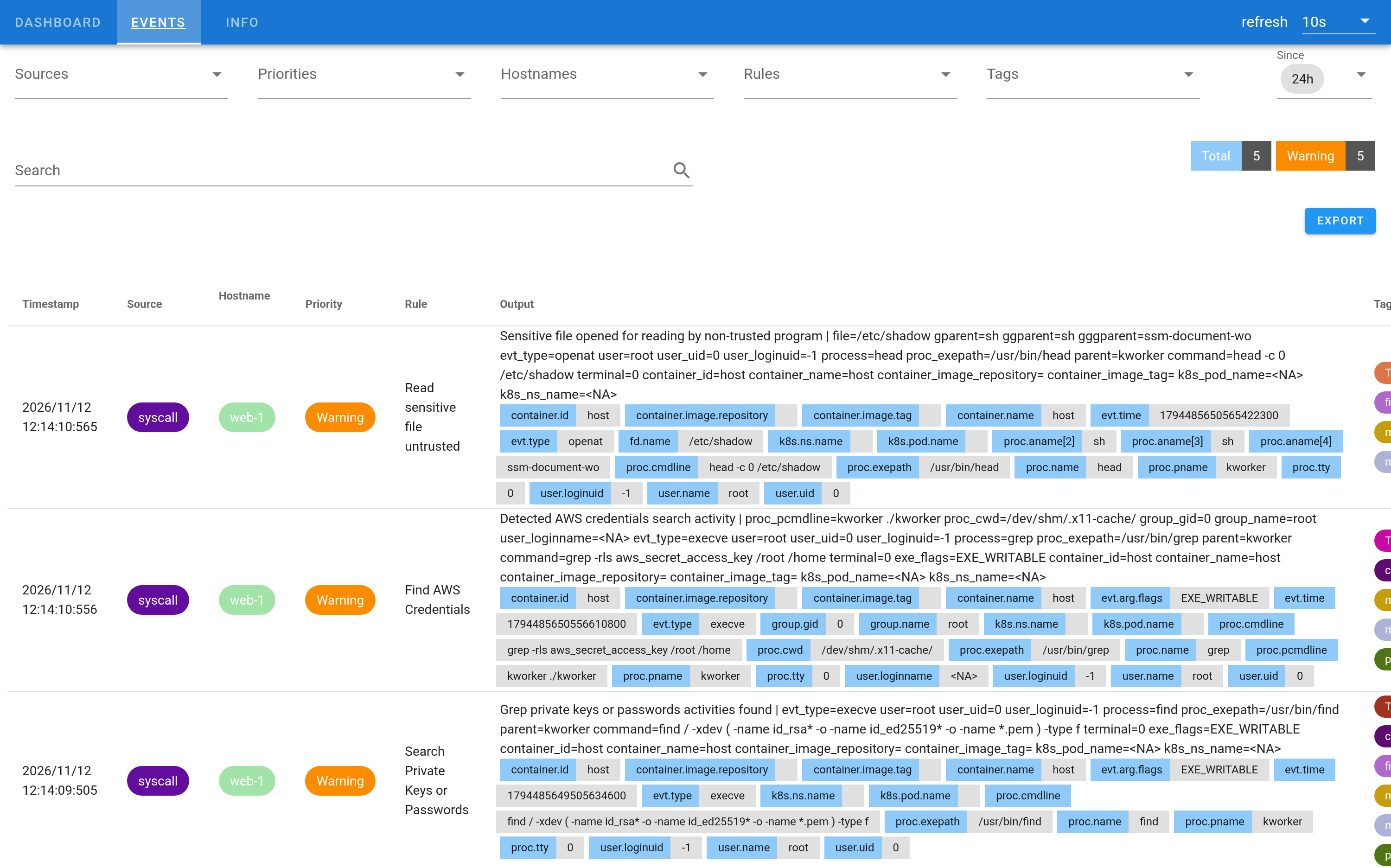
We planted the stand-in at 12:14:04. Within six seconds Falco raised five events on web-1 from four rules: execution from /dev/shm, the private-key search, the AWS credentials search and the /etc/shadow read. Three are shown here.
The alert bridge on the fleet proxy maps the rules you choose to playbooks and ignores the rest. Here it mapped Search Private Keys or Passwords to the lateral-movement-credential-access playbook. That event arrived at 12:14:09.505, and the bridge ran the playbook's 8 read-only checks on web-1 straight away. By 12:14:09.75, a quarter of a second later, every result was signed by web-1 and saved as an evidence case. The other rules' events were logged and ignored, so one attack ran one playbook.
At 12:17:29 we started Claude with one tool: the Secronyx fleet proxy. The Falco events went into its first prompt. No shell, no file access and no Falco access beyond that. Nobody steered it after the first prompt. It read the bridge's results, went further where the evidence pointed, compared web-1 with web-2, and wrote its report at 12:20:43. It made 35 calls, all to Secronyx.
Its verdict was likely compromise on web-1, medium confidence, and it named:
- the full process chain, from the AWS Systems Manager document worker through two shells to the fake
kworkerandfind, with its working directory in/dev/shm; - that it ran as root with no login session, so it came through Systems Manager Run Command, not SSH;
- that the process was still alive four minutes later as
sleep, disguised as[kworker/u4:3], and that its parent shell had been detached so it would outlive the command; - that the images were the system's own
bashandsleep, with nothing deleted, fileless or mapped from/dev/shm; - that it held no sockets and left no cron jobs, timers or startup items;
- that web-2 has none of this.
Its conclusion was sharp: whoever sent the command holds Systems Manager rights on the instance, so the real scope is in AWS, not on web-1. It said that only CloudTrail could tell whether this was an approved exercise.
It also found something the alerts didn't mention, and it's real. web-1 had briefly held a user, backup-sync, with an SSH key and a timer, created and deleted twice that morning. That was our Elastic Security demo: a rehearsal, then the recording, then clean-up. Claude flagged it as a lead for a person to check.
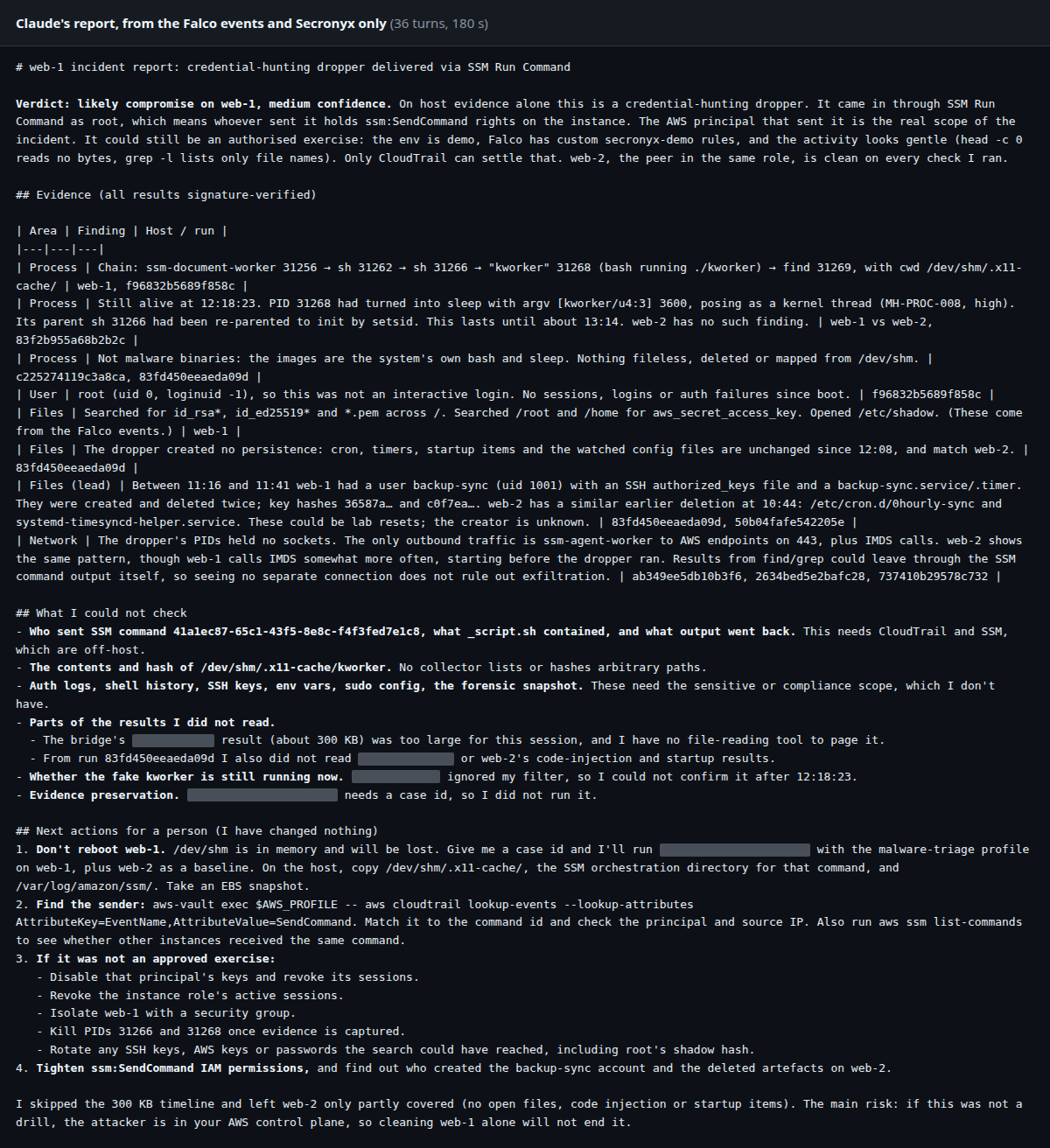
Claude's report, unedited apart from the blanked tool names.
It was also clear about its limits:
- It could not read the dropped script or hash it, because Secronyx doesn't return the contents of arbitrary files.
- It could not read auth logs, shell history or SSH keys, which need a scope this policy doesn't give the AI.
- One of the bridge's results, a 300 KB timeline, was too big for it to read in full, and it said so rather than guess.
- It passed a name filter that the process check doesn't take, so it could not confirm the fake
kworkerwas still running after 12:18.
It proposed keeping web-1 running so the in-memory /dev/shm survives, preserving evidence, finding the sender in CloudTrail, and only then containing the host and rotating anything the search could have reached. It changed nothing, because Secronyx can't change a host.
What Secronyx proves
What the AI actually saw
Before a host runs anything, it checks a single-use pass signed by the fleet proxy, naming the caller and the rule that allowed the call. The host then writes the call to its own tamper-evident audit log. web-1's log shows the bridge's 8 checks, then Claude's 15 follow-ups, each under its own rule.
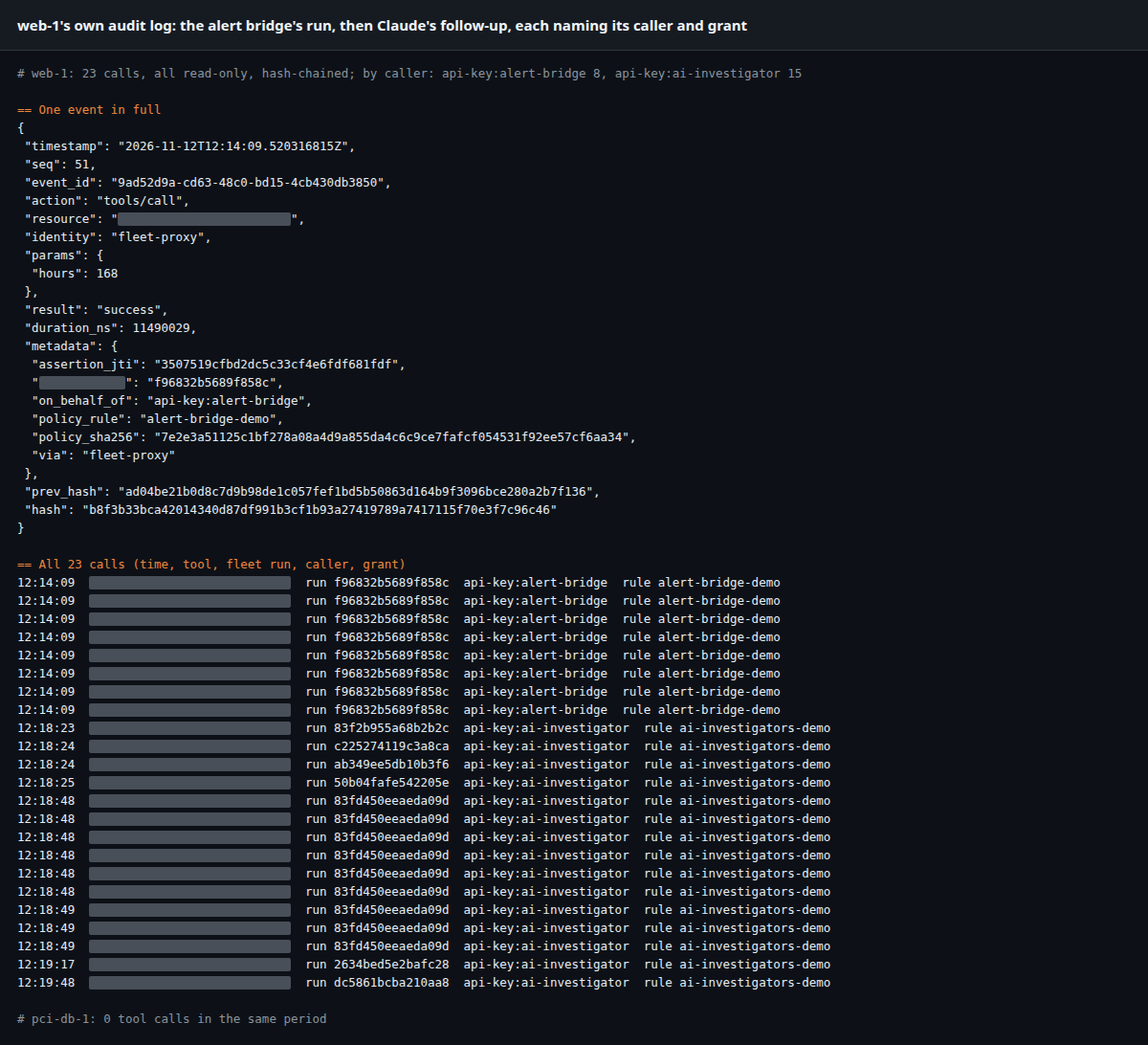
web-1's audit log. Each call names who it was for (the alert bridge or the AI investigator), the run and the rule that allowed it.
What it wasn't allowed to see
pci-db-1, a database host labelled as holding card data, is reserved for the security team. On the fleet it is outside Claude's access, and Claude stayed on the two hosts its access covers. pci-db-1's own audit log has no calls from this investigation, because nothing reached it.
Evidence you can check later
The bridge's evidence case can be checked offline by anyone with secronyx evidence verify. It checks the proxy's signature, the fingerprint (hash) of every result and web-1's signature on its own results. All 18 findings verified. Then we changed one stored result, renaming kworker to kwerker, and verification failed, naming the result.
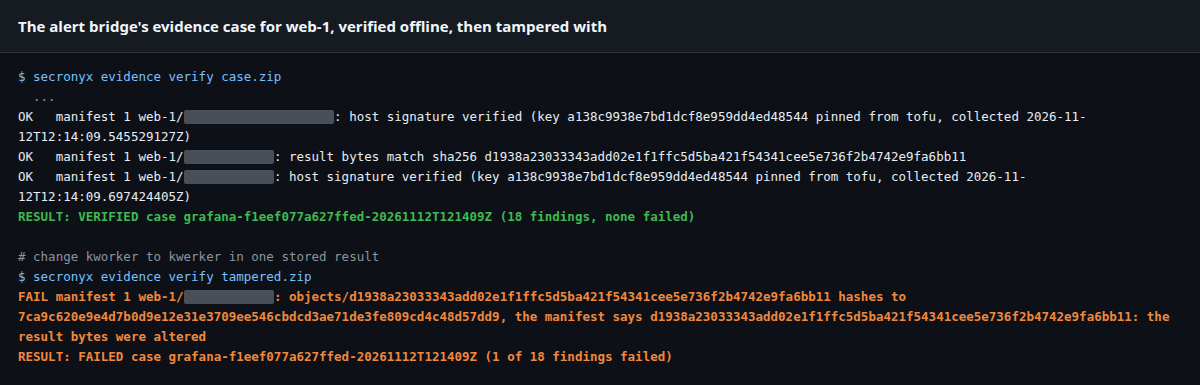
Green: the case verifies. Amber: change one letter in one stored result and it fails.
Why Secronyx alongside Falco
Falco
Watches system calls as they happen and raises an event the moment a rule matches: a shell in a container, a read of a sensitive file, a program run from memory.
Secronyx
Answers from inside the host, after the event: process trees, users, services, timers, files, connections and configuration. It decides what each caller may see and records every answer.
Falco detects and Claude does the reasoning. Secronyx provides the controlled, read-only access to host-level evidence, with independently verifiable records of every investigation.
- Evidence within a second of the event. The bridge runs a fixed playbook as soon as the event arrives, while the process is still running, so the evidence reflects the moment it fired.
- The questions Falco can't answer alone. Falco saw one system call. Secronyx could also say what launched it, whether it is still running, what it left behind and what the twin host looks like now.
- No model inside the product. The bridge is deterministic. Any AI that speaks MCP can pick up from its results, and so can a person.
- No plugin. Falcosidekick's standard webhook output posts each event to the bridge with its own key, which can post events and nothing else.
- A label policy decides what each caller may see, the bridge and the AI alike, and restricted hosts stay invisible.
- Every check is in the answering host's own audit log, and the results are signed so they can be checked long after the incident.
Why not just run a script from the alert?
Falcosidekick can call any webhook, so a team could point it at a script that logs in to the host and runs commands. That works, but it moves the risk rather than removing it.
| Webhook to your own script over SSH | Falco + Secronyx | |
|---|---|---|
| Can it write | Whatever the script's account can, and the AI can if it drives the script | No. There is no write path |
| Credentials | An SSH key or sudo rule on every host | Each host dials out to the proxy with its own key; the Falco key can only post events |
| Knows what to check | What someone wrote into the script, per OS | Playbooks and 630 named, typed checks (661 with sensitive checks enabled), the same on Linux, macOS and Windows |
| Secrets | Whatever the commands print | Removed before results leave the host |
| Authorisation | One account, one level of access | Per check, per caller and per host label |
| Audit | Shell history the same account can edit | Each host's own hash-chained log, naming the caller and the rule |
| Evidence | Text output, if someone saves it | Signed results that verify offline |
How it fits together
The bridge and Claude talk only to the Secronyx fleet proxy, which passes read-only checks to the hosts each of them may see. The hosts connect out to the proxy, so none of them opens a listening port.
How it's set up
Install Secronyx on each host. Here that's three EC2 instances: web-1 and web-2, the web tier, and pci-db-1, a database labelled as holding card data. Falco 0.45 runs on the web servers with the modern eBPF driver and its default rules, sending JSON events to Falcosidekick.
Tell Falco that Secronyx reads sensitive files on purpose. Some Secronyx checks, such as account password status, read files like
/etc/shadow, which Falco's default rules flag. One list entry in a local rules file stops that noise without turning the rule off:- list: read_sensitive_file_binaries items: [secronyx] append: trueRun the Secronyx fleet proxy with the alert bridge. One config file maps each Falco rule you care about to a playbook. The event's hostname picks the host.
Write the label policy. The bridge and the AI may see hosts labelled
env=demo. Hosts labelleddata=pciare reserved for people in thesecopsgroup.Point Falcosidekick's webhook output at the bridge, with its own key:
webhook:
  address: https://fleet-proxy.example.com/integrations/falco/events
  minimumpriority: warning
  customHeaders:
    X-API-Key: <key with scope integrations:falco>
Connect your AI. Claude Code connected to the fleet proxy as an MCP server with a key in the
ai-investigatorsgroup. We fetched the Falco events from Falcosidekick's UI and put them in the first prompt.
Try it on your fleet
Secronyx is in beta. Tell us about your fleet and we'll help you connect it to Falco.
Read more: fleet deployment · the Elastic Security demo · the Alertmanager demo · the AWS DevOps Agent demo
Falco® is a registered trademark of The Linux Foundation. Secronyx works with Falco and Falcosidekick, open-source projects of the Falco community; it is not part of them. Claude is a trademark of Anthropic. AWS is a trademark of Amazon.com, Inc. or its affiliates. Other names are trademarks of their owners. Secronyx is not affiliated with, sponsored or endorsed by The Linux Foundation, the Falco project or Amazon.
Built 2026-11-11. Found a mistake? Tell us.